


Pervasive Design Prototype

Our personal, comfort spaces aren’t designed to support those same levels of productivity, and this is increasingly becoming evident.
Remote work and virtual learning environments have made the comfort of our homes into an office, classroom, and general working space. But blurring these environments comes with a cost: dimming focus and boundaries between work and relaxation, and a constant struggle to stay accountable.
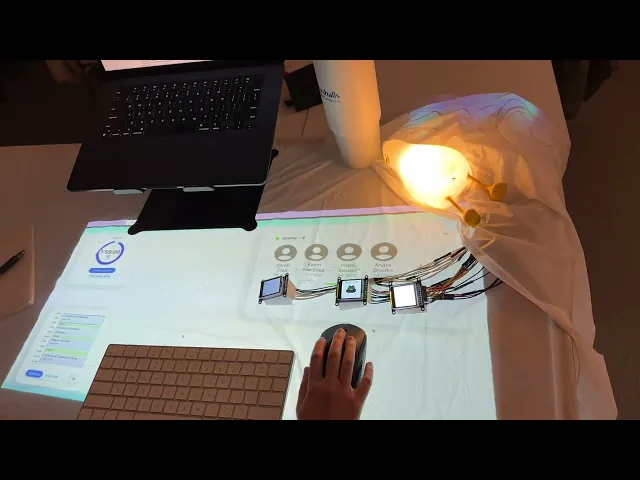
Smart Mouse Pad is designed to improve productivity and reduce fatigue with a workspace that makes focus and accountability effortless.
The goal is simple: help users work more efficiently when they are supposed to, so they can truly disconnect when the day is done. With integrated pressure sensors integrated with a digital mousepad interface, it provides non-obtrusive accountability to track your presence and keep you on task. Its physical size and footprint provides a distinction between where work begins and ends, centralizing key information and tools that a user would need to stay productive.
As this is a prototype of a design idea that is intended to be realized within the next 10 years after relevant technologies are available and easy to access and implement in a consumer product, our final prototype and technology/sensors used will approximate what we envision this mousepad to be.
As students, we all experienced the dreaded hour long doom-scroll that was supposed to be a five minute quick break; or the long, disorienting nap because the bed looked too comfortable. These experiences led us to explore core problems in this realm and how we could help increase student productivity at home through the help of IoT devices.
Diary Study 📔
To capture the daily routines, habits, and decision-making of students in WFH environments
Survey 📊
To identify broad patterns in WFH break frequency, attitudes, and preferences across a large sample.
Here were the key findings we learned that helped guide our system design:

We wanted to understand what aspects of the proposed system concepts participants would feel comfortable, intuitive, confusing, or even intrusive so that we could make appropriate iterations on the concept before delving into higher-fidelity prototyping.
From 5 different UE scenarios, we deducted 3 findings
Users value accountability but only when provided by trusted friends/peers.
We shifted the focus to preserving the community element and an invite feature to incorporate with personal connections.
Users strongly prefer a subtle but noticeable ambient light for work/rest transitions over stressful clock countdowns.
We realized we needed to utilize cues to keep users on track without making them hyper aware of their ability to adhere to a schedule.
Users expressed deep discomfort with continuous camera and eye-tracking monitoring.
We decided to explore alternative, less-intrusive presence-tracking methods.
The criteria for the high-fidelity system:
Product needs to have a physical sensor that isn't a camera to address user concerns about privacy.
The solution has to be unobtrusive to workflows with cues subtle enough to avoid distraction, but still informs the user about any information the system is trying to communicate.
The system had to include an accountability system with people users were familiar with.
The product had to help users physically distinguish their work zone to establish a sense of designated working space/area.
The entire system needed to be integrated within one device and address the pain point of managing a product across multiple devices.
This directly solves the lack of motivation and accountability we saw in the home environment
It lets users add a friend to a shared, real-time work session to digitally be in the session
We built and used TFT screens to be placed into these little squares which would show up and prompted when the user touches the sensor - indicating their “work mode”
Our optimal scheduling forces the user to take breaks at the right time, preventing them from hitting critical mental fatigue
The mousepad is synced with the users calendar, Canvas, and other
All calendars are synced to create an optimal schedule which includes breaks
Users are allowed to adjust priority of tasks and select which tasks or events they want to focus on for the day
This soft ambient color helps ease the user back into work mode, solving the 'Difficulty Restarting' problem
Approaching breaks, the blue turns to a teal color
During breaks, the light is a bright green to signal that its their break time
As the break ends, the light turns to a warm orange in the final 2 minutes of the break
Product Demo
Limitations
Constraints in Designing for Speculative AI
We weren’t able to flesh out as many interactions regarding the onboarding and logistics of gathering and displaying data relevant to users’ productivity. This left some unanswered questions such as what the interface would look like if a user abruptly stopped working, how the system made decisions about how much time to allot to certain tasks, etc.
Balancing Data Fidelity with User Privacy
In early ideation, we considered incorporating eye-tracking to monitor fatigue, focus, and engagement. However, from user research, we found that this posed a lot of privacy concerns and would potentially dissuade people from adopting the product into their work from home environments. With more time, our team would further explore the interactions, thresholds, and data-handling logic needed to create the most responsible, transparent, and accurate version of this productivity-tracking system.
Accessibility Acknowledgement
Our smart mousepad utilizes a wide range of visual cues—from ambient lighting and subtle visual notifications to on-screen avatars representing productivity partners. While these cues are intentionally designed to be non-intrusive to avoid interrupting productive work sessions, they also assume a baseline level of visual acuity. For users with low vision or visual impairments, these design decisions may limit the usability of the product. The use of color and ambient light can accommodate a variety of visual needs, however these cues alone are insufficient for users who rely on non-visual information, and make other aspects of the product inaccessible.
The ability to switch between output modalities (visual, auditory, tactile) would be an essential feature to develop further. This could include haptic pulses for break reminders, adjustable audio cues for timers, or customizable combinations of feedback types depending on user preference. Providing multimodal options ensures that users can engage with the system in the way that best supports their abilities, contexts, and preferences.
